

Beach Buggy Racing is one of those games that lands somewhere between a serious racing sim and a party game, and it leans hard into the fun side. Made by Vector Unit, it’s a free 3D kart racer where you fling colorful buggies around tropical tracks, fire off power-ups, and try to cross the line first. If you grew up on couch kart racers, the format will feel instantly familiar. The twist is that Beach Buggy Racing was built for mobile, which raises an obvious question for anyone who prefers a bigger screen: how does it hold up on a Windows PC, and what’s the practical way to run it there?
This guide covers what the game is, how it plays, and the general approach to getting it running on a desktop.
What Beach Buggy Racing Actually Is
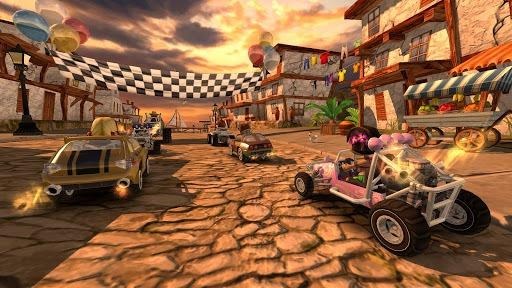
At its core, this is arcade kart racing. You pick a driver, pick a car, and race against a field of AI opponents across beaches, jungles, volcanoes, and swamps. The tracks are packed with jumps, shortcuts, and hazards, and the whole thing runs on cartoon physics that reward drifting and aggressive lines over careful braking.
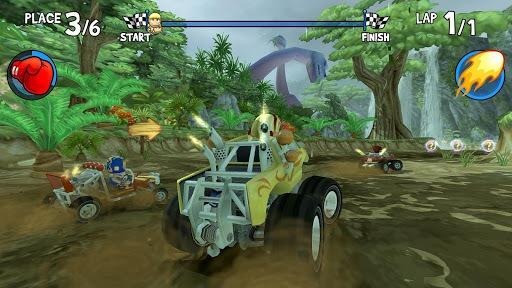
The hook is the item system. During a race you drive over power-up boxes and collect things like fireballs, oil slicks, tornadoes, and a dodgeball that knocks rivals sideways. Managing when to use an offensive item versus when to hold a defensive one is most of the strategy. A well-timed shield can save a lead; a lucky pickup on the final lap can steal a win you had no business getting.
The four verbs in the game’s own summary sum up the loop well: race, collect, upgrade, and win. You race events, collect coins and new characters, upgrade your buggies to go faster and handle better, and work your way up through tougher championships. There’s a decent roster of drivers, each with a special ability, and a garage full of vehicles ranging from dune buggies to muscle cars and monster trucks.
Who It’s For
Beach Buggy Racing is squarely aimed at people who want quick, low-commitment fun. Races last a couple of minutes, so it fits into short sessions, but the upgrade grind gives it enough depth to keep going for hours if you want. It’s family friendly, easy to pick up, and forgiving enough that younger players can enjoy it without getting frustrated.
If you’re coming from console kart racers and expecting deep tuning or precise handling, adjust your expectations. This is a game about chaos and comebacks, not lap-time perfection. That’s the appeal for a lot of players, and it’s why the item-throwing carnage carries the experience.
Why Play It on a PC
The game was designed for phones and tablets, but there are good reasons people want it on desktop. A larger monitor makes the busy tracks easier to read, especially when three items are flying at you at once. A keyboard or a plugged-in game controller gives you steadier steering than tilt or touch controls, which matters when you’re threading a tight shortcut at speed. And running it on a PC means you’re not draining a phone battery or overheating a tablet during a long play session.
The controls are the biggest practical win. Steering with keys or a gamepad, with items mapped to dedicated buttons, feels far more natural than tapping glass. For a game where reaction timing decides races, that responsiveness makes a real difference.
How to Play Beach Buggy Racing on Windows
Because there’s no native Windows build of the mobile version, the usual route is an Android emulator. An emulator is a program that creates a virtual Android environment on your PC, letting mobile apps run inside a window on your desktop. The general process looks like this.
First, pick an emulator. Popular options include BlueStacks, LDPlayer, and MEmu, all of which are built with games in mind and handle 3D titles reasonably well. Install the emulator the same way you would any Windows program, then launch it and sign in with a Google account so you can reach the Play Store inside the virtual environment.
From there you search for the game in the store, install it, and it appears on the emulator’s home screen like an app on a phone. Rundowns that walk through the specifics of how to play Beach Buggy Racing on PC tend to cover the same core steps, with a few emulator-specific settings worth knowing about.
Once it’s installed, spend a minute on the controls. Most emulators let you map keyboard keys to on-screen buttons, so you can assign steering to the arrow keys or WASD and put accelerate, brake, and item use on comfortable keys. If you have a USB or Bluetooth controller, plug it in before you start; the better emulators detect gamepads automatically and let you bind them the same way. Getting this setup right before your first race saves a lot of fumbling.
A couple of performance notes. In the emulator’s graphics settings, matching the resolution to your monitor keeps the game sharp, and enabling any available GPU or hardware acceleration option helps the 3D scenes run smoothly. Beach Buggy Racing isn’t a demanding title, so most modern PCs will handle it at high frame rates without trouble, but a mid-range machine with a few gigabytes of RAM assigned to the emulator gives you headroom.
What the Experience Feels Like on Desktop
Playing on a monitor changes the pacing a little. On a phone you’re often reacting to items late because the screen is small and your thumbs cover part of it. On a bigger display you can see threats coming and plan your shortcuts, which makes the racing feel more deliberate. The bright, saturated art style also holds up nicely scaled up, since the tracks are designed with bold colors and clear landmarks.
The upgrade grind plays the same regardless of platform, but a lot of players find it more comfortable to manage the garage, tune vehicles, and browse the driver roster with a mouse. Menu navigation that felt fiddly on a small touchscreen becomes quick and precise.
One thing to keep in mind: since you’re running the mobile version inside an emulator, you’re getting the mobile game exactly as it exists, including its free-to-play structure. Progression, currency, and any in-app purchases work the way they do on a phone. The emulator changes how you control and view the game, not what the game is.
Final Thoughts
Beach Buggy Racing earns its reputation as an approachable, chaotic kart racer that’s easy to enjoy in short bursts and satisfying to grind over time. Vector Unit built a game that’s colorful, fast, and forgiving, which is exactly what a lot of people want from an arcade racer. Running it on Windows through an emulator adds a bigger screen and proper controls, two things that suit its item-slinging, drift-heavy style well. If you already like the game on mobile, the desktop version through an emulator is worth trying for the improved comfort alone, and if you’re new to it, the PC setup is a fine place to start.